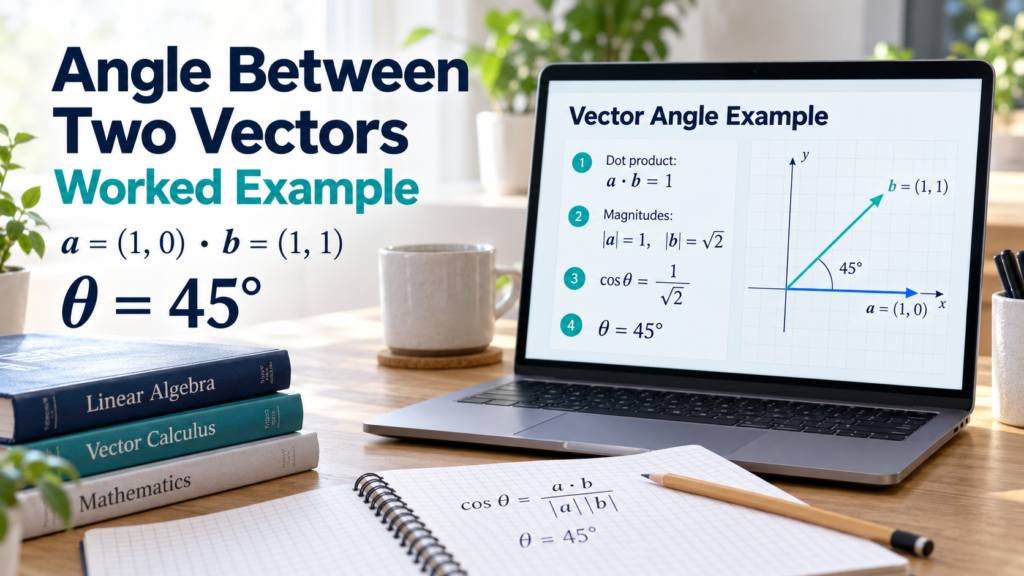
Angle Between Two Vectors Calculator Example (With Full Worked Steps)
This guide shows exactly how to find the angle between two vectors using the dot product.
You will see the formula broken down, three complete worked examples you can check by hand,
the common mistakes that produce wrong answers, the difference between degrees and radians,
and how to verify a result from an
angle between two
vectors calculator. By the end you can compute the angle for any pair of vectors —
in two or three dimensions — and know when the answer is right.
Last reviewed: ·
Approximate reading time: 10 minutes
What is the angle between two vectors?
A vector is an arrow with a length and a direction. Two vectors drawn from the same starting
point form an angle between them — the smaller angle, always between 0° and 180°. That angle
measures how far apart their directions are. When the vectors point the same way the angle
is 0°. When they point in exactly opposite directions the angle is 180°. When they are
perpendicular the angle is 90°.
The angle is computed from the dot product and the lengths
of the two vectors. Those three quantities are all you need. No trigonometry tables, no
measuring, no drawing — just arithmetic followed by one inverse cosine.
The angle θ between two nonzero vectors a and b is:
cos θ = (a · b) ÷ (|a| × |b|)
Then take the inverse cosine to get the angle:
θ = arccos( (a · b) ÷ (|a| × |b|) )
What each symbol means
- a · b — the dot product of the two vectors. Multiply matching components and add the results.
- |a| — the length (magnitude) of vector a.
- |b| — the length of vector b.
- cos θ — the cosine of the angle between them.
- arccos — the inverse cosine function (also written cos⁻¹).
How to compute the dot product
For two 2D vectors a = (a₁, a₂) and b = (b₁, b₂):
a · b = a₁ × b₁ + a₂ × b₂
For two 3D vectors a = (a₁, a₂, a₃) and b = (b₁, b₂, b₃):
a · b = a₁ × b₁ + a₂ × b₂ + a₃ × b₃
The result is a single number, not a vector. Multiply matching components, then add.
How to compute a vector’s length
The length of a vector is the square root of the sum of the squares of its components:
|a| = √(a₁² + a₂²) (2D) |a| = √(a₁² + a₂² + a₃²) (3D)
This is the Pythagorean theorem applied to the vector’s components. It is always
non-negative, and it is 0 only for the zero vector.
The four steps, in order
- Find the dot product a · b. Multiply matching components and add.
- Find both lengths |a| and |b|.
- Divide the dot product by the product of the lengths. This gives cos θ.
- Take the inverse cosine to get θ. Convert to degrees if needed.
The order matters. If you round the dot product or the lengths too early, the cosine will
be slightly off, and the inverse cosine magnifies small errors near 0° and 180°. Keep full
precision until the last step.
Worked example 1: vectors (3, 4) and (4, 3)
This is the classic example: two vectors of equal length that are close to each other in
direction, so the angle is small.
Step 1 — Find the dot product
(3 × 4) + (4 × 3) = 12 + 12 = 24.
Step 2 — Find both lengths
- |a| = √(3² + 4²) = √(9 + 16) = √25 = 5.
- |b| = √(4² + 3²) = √(16 + 9) = √25 = 5.
Step 3 — Divide
cos θ = 24 ÷ (5 × 5) = 24 ÷ 25 = 0.96.
Step 4 — Take the inverse cosine
θ = arccos(0.96) ≈ 16.2602°.
Answer: the angle between (3, 4) and (4, 3) is about 16.26°.
Sanity check: the two vectors are similar in direction — (3, 4) points up and right,
(4, 3) also points up and right — so a small angle makes sense. If you had picked (3, 4)
and (−4, 3), the angle would be 90°, because the dot product is zero.
Worked example 2: perpendicular vectors (1, 0) and (0, 1)
This example shows what a 90° angle looks like in the arithmetic. It is the easiest case
to check by hand.
Step 1 — Find the dot product
(1 × 0) + (0 × 1) = 0 + 0 = 0.
Step 2 — Find both lengths
- |a| = √(1² + 0²) = 1.
- |b| = √(0² + 1²) = 1.
Step 3 — Divide
cos θ = 0 ÷ (1 × 1) = 0.
Step 4 — Take the inverse cosine
θ = arccos(0) = 90°.
Answer: the angle between (1, 0) and (0, 1) is exactly 90°.
Any time the dot product is zero, the vectors are perpendicular (orthogonal). That is a
useful shortcut in linear algebra and geometry: you can test for perpendicularity without
computing any lengths or angles.
Worked example 3: 3D vectors (1, 2, 2) and (2, 1, −2)
Three-dimensional vectors work exactly the same way. You just have one more component
to multiply in the dot product and one more square in each length.
Step 1 — Find the dot product
(1 × 2) + (2 × 1) + (2 × −2) = 2 + 2 + (−4) = 0.
Step 2 — Find both lengths
- |a| = √(1² + 2² + 2²) = √(1 + 4 + 4) = √9 = 3.
- |b| = √(2² + 1² + (−2)²) = √(4 + 1 + 4) = √9 = 3.
Step 3 — Divide
cos θ = 0 ÷ (3 × 3) = 0.
Step 4 — Take the inverse cosine
θ = arccos(0) = 90°.
Answer: the angle between (1, 2, 2) and (2, 1, −2) is exactly 90°.
Both vectors have length 3, and the dot product is zero, so they are perpendicular.
You can verify the perpendicularity by checking that their dot product is zero — you do
not need to compute the angle at all.
A side-by-side summary of the three examples
| Vector a | Vector b | a · b | |a| | |b| | cos θ | θ |
|---|---|---|---|---|---|---|
| (3, 4) | (4, 3) | 24 | 5 | 5 | 0.96 | ≈ 16.26° |
| (1, 0) | (0, 1) | 0 | 1 | 1 | 0 | 90° |
| (1, 2, 2) | (2, 1, −2) | 0 | 3 | 3 | 0 | 90° |
Degrees vs. radians
The inverse cosine returns an angle in radians by default in most programming languages
and many calculators. One full turn is 2π radians, which equals 360°. To convert radians
to degrees, multiply by 180 ÷ π.
degrees = radians × 180 ÷ π
For example, arccos(0.96) ≈ 0.2838 radians. Multiply by 180 ÷ π: 0.2838 × 57.2958 ≈
16.26°. Both numbers describe the same angle; only the unit differs. The MathStatCalc
calculator shows degrees by default and notes the radian value.
Common mistakes (and how to avoid them)
- Forgetting the second length in the denominator. The denominator is
|a| × |b|, not just |a| or just |b|. Dividing by only one length gives a wrong cosine. - Mixing up dot product and cross product. The dot product produces a
scalar and is used for the angle. The cross product produces a vector and is used for
area and for perpendicular directions. - Rounding the dot product or lengths too early. Keep full precision
through step 3. Small errors near cos θ = 1 or cos θ = −1 get magnified by arccos. - Using the wrong component order. Pair a₁ with b₁, a₂ with b₂, a₃ with b₃.
Swapping components silently changes the dot product. - Assuming the answer can exceed 180°. The angle between two vectors is
always between 0° and 180°. If you get a larger number, you subtracted vectors instead
of measuring the angle between them. - Zero vector in the input. A vector with length 0 has no direction, so
the angle is undefined. The formula would divide by zero. The calculator detects this
and reports it clearly.
Shortcuts and special cases
- Dot product is 0 → the vectors are perpendicular, θ = 90°. No need to compute lengths.
- Vectors point the same way (one is a positive multiple of the other) → θ = 0°.
- Vectors point in opposite directions (one is a negative multiple of the other) → θ = 180°.
- Equal-length vectors → the denominator is |a|², so cos θ = (a · b) ÷ |a|². Saves one square root.
- Unit vectors → |a| = |b| = 1, so cos θ is just the dot product.
These shortcuts are common in linear algebra and physics. They are worth memorizing —
they let you skip arithmetic and check your answer instantly.
How to check your answer with a calculator
The MathStatCalc
angle between two vectors calculator follows exactly the four steps shown in this guide.
To verify an example:
- Open the calculator page.
- Enter vector a and vector b, one component per field (or comma-separated). For example:
3, 4and4, 3. - Run the calculation.
- Compare the dot product, both lengths, cos θ, and θ with the values in this guide: 24, 5, 5, 0.96, and about 16.26°.
If any of the intermediate values do not match, the vectors were typed incorrectly (for
example, a missing minus sign, a swapped component, or a missing comma). Fix the input
and run it again.
Reference values you can verify by hand
Use these small fixtures to test any implementation of the angle formula:
- (1, 0) and (0, 1) → dot 0, lengths 1 and 1, cos 0, θ = 90°.
- (1, 0) and (1, 0) → dot 1, lengths 1 and 1, cos 1, θ = 0°.
- (1, 0) and (−1, 0) → dot −1, lengths 1 and 1, cos −1, θ = 180°.
- (3, 4) and (4, 3) → dot 24, lengths 5 and 5, cos 0.96, θ ≈ 16.26°.
- (1, 2, 2) and (2, 1, −2) → dot 0, lengths 3 and 3, cos 0, θ = 90°.
If your tool gives a different value for any of these, the tool is wrong — not the fixture.
Report it through the contact page.
Frequently asked questions
Can the angle between two vectors be negative?
No. The angle between two vectors is defined as the smaller angle between them, from 0°
to 180°. Arccos always returns a value in [0, π] radians, so the result cannot be negative.
Can the angle be greater than 180°?
No, for the same reason. If you get a number above 180°, you have probably measured the
angle between one vector and the negative of the other. Double-check which vectors you
entered.
What if the dot product is negative?
A negative dot product means the angle is obtuse — greater than 90° and up to 180°. The
cosine is negative in that range. The formula still works; just take arccos of the negative
value.
Can the angle between two vectors be zero?
Yes, when the two vectors point in the same direction. That happens when one vector is a
positive multiple of the other, and the cosine is 1. For example, (1, 2) and (2, 4) have
an angle of 0° between them.
What happens if one of the vectors is the zero vector?
The zero vector has length 0, so the denominator in the formula becomes 0. The angle is
undefined. The calculator detects this case and reports it instead of dividing by zero.
Does the formula work for vectors with more than three dimensions?
Yes. The dot product and length formulas extend to any number of dimensions by adding more
terms: multiply matching components and sum, and square each component and sum. The angle
formula is unchanged.
How is this different from the cross product?
The dot product measures how much the two vectors point in the same direction, and it
gives a scalar. The cross product measures the area they span and the direction perpendicular
to both, and it gives a vector. The angle can also be found from the cross product magnitude,
but the dot product is simpler and works in every dimension.
Why is the denominator |a| × |b|?
Because the cosine of the angle must be between −1 and 1. If you divided by anything other
than the product of the two lengths, the result could exceed that range. Dividing by the
product of the lengths normalizes both vectors to unit length first, which guarantees a
valid cosine.
Can I use this formula in radians directly?
Yes. The arccos function returns radians by default. Convert to degrees by multiplying by
180 ÷ π. Or, if your calculator lets you set the unit, set it to degrees.
Related guides and calculators
- Angle between two vectors calculator — the tool that follows this guide step by step.
- Distance between two points calculator — same length formula, applied to points.
- Midpoint calculator — the point exactly halfway between two points.
- Law of cosines calculator — the same dot-product idea, applied to triangles.
- All geometry and trigonometry calculators
- Mean absolute deviation — worked example guide
- Guides
Method and accuracy notes
This guide was checked against hand-computed values and the MathStatCalc calculator on
. The calculator keeps full precision
through the intermediate steps and rounds the final angle to six decimal places, with
trailing zeros removed. Angles are shown in degrees by default. See the
methodology page for the full test
and correction process, or email
contact@mathstatcalc.com if you find an error.